1
/
of
8
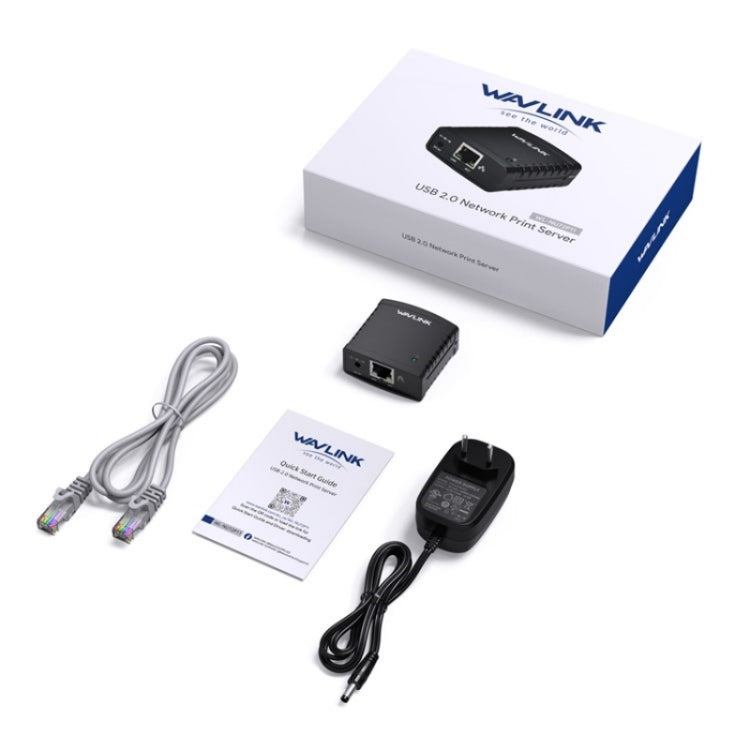
WAVLINK NU72P11 100Mbps Network Print Server USB 2.0 Network Printer Power Adapter, US Plug, UK Plug, EU Plug, AU Plug
WAVLINK NU72P11 100Mbps Network Print Server USB 2.0 Network Printer Power Adapter, US Plug, UK Plug, EU Plug, AU Plug
Regular price
£22.99 GBP
Regular price
Sale price
£22.99 GBP
Shipping calculated at checkout.
Quantity
Couldn't load pickup availability
Features:
1. USB2.0 printer server: USB printer 10/100Mbps Ethernet port, USB2.0 MFT printing shared LAN network printer
2. Save space and time: No need to have a dedicated computer to share the printer, allowing printing from any computer on the network, saving you the cost of owning a printer or the hassle of manually sharing a printer with multiple computers.
3. Energy saving: Using highly integrated chips and low power consumption, it greatly saves energy and reduces costs compared with traditional printers.
4. Web management and flexible placement: The built-in Web management function provides additional convenience, allowing users to configure, monitor and even reset the print server through a Web browser, making it easy to use. Print jobs can even be sent to a printer in another country as easily as they are sent to a printer in the same office.
5. Easy to install: Compact and lightweight, easy to install with simple setup wizard and web-based remote management. Connect the print server to the printers USB port using a USB cable, then connect it to the rest of the network using an RJ-45 network cable.
6. Support LPR network printing and Bonjour printing service: The printer server supports the LPR (Line printer Remote) protocol to realize network printing. It also supports Bonjour Print Services, making it easier to find and configure printers on the network.
Steps for usage:
1. First, you need to use it in LAN.
2. Secondly, install the driver, then open the driver and search for the device in the driver interface.
3. Click the connection option. After the connection is successful, you can open the printer.
Notice:
1. Setup is one-time. You dont have to run this process every time you print. If you remove the installation wizard, it will no longer work.
2. The printer or MFP installed and in use on your computer will have automatic connected printing enabled.
3. Auto-disconnect printer devices may not work with storage devices (such as pen drives, flash drives, etc.).
4. Not compatible with Mac OS devices.
1. USB2.0 printer server: USB printer 10/100Mbps Ethernet port, USB2.0 MFT printing shared LAN network printer
2. Save space and time: No need to have a dedicated computer to share the printer, allowing printing from any computer on the network, saving you the cost of owning a printer or the hassle of manually sharing a printer with multiple computers.
3. Energy saving: Using highly integrated chips and low power consumption, it greatly saves energy and reduces costs compared with traditional printers.
4. Web management and flexible placement: The built-in Web management function provides additional convenience, allowing users to configure, monitor and even reset the print server through a Web browser, making it easy to use. Print jobs can even be sent to a printer in another country as easily as they are sent to a printer in the same office.
5. Easy to install: Compact and lightweight, easy to install with simple setup wizard and web-based remote management. Connect the print server to the printers USB port using a USB cable, then connect it to the rest of the network using an RJ-45 network cable.
6. Support LPR network printing and Bonjour printing service: The printer server supports the LPR (Line printer Remote) protocol to realize network printing. It also supports Bonjour Print Services, making it easier to find and configure printers on the network.
Steps for usage:
1. First, you need to use it in LAN.
2. Secondly, install the driver, then open the driver and search for the device in the driver interface.
3. Click the connection option. After the connection is successful, you can open the printer.
Notice:
1. Setup is one-time. You dont have to run this process every time you print. If you remove the installation wizard, it will no longer work.
2. The printer or MFP installed and in use on your computer will have automatic connected printing enabled.
3. Auto-disconnect printer devices may not work with storage devices (such as pen drives, flash drives, etc.).
4. Not compatible with Mac OS devices.
Specification:
| Package Weight |
|
M
Mira Sales
Verified Seller on Bidnamic Store
Free Shipping
Free Shipping
Shipping Overview:
- Daily Cut-Off: Orders placed before 16:00 GMT are prepared the same working day
- Preparation Time: 0–2 working days (Monday to Friday)
- Delivery Window: 5–9 working days after dispatch (Monday to Friday)
- UK Delivery: Free shipping is provided on all orders within the United Kingdom
For more information, click here
30-Days Return
30-Days Return
Essential Details:
- Return Window: 30 days from the date of delivery
- Restocking Fees: None
- Refund Timeline: Usually within 7 business days
- Return Shipping: Customers cover the cost of sending items back
For more information, click here